Core Web Vitals: Why a Fast, Stable Website Is Better for Everyone
Learn what LCP, INP, and CLS measure, how to check your site, and what a desktop Lighthouse score can—and cannot—tell you.
A website can look polished and still feel slow when someone tries to use it. A page may take too long to show its main message, ignore a tap for a moment, or shift just as a visitor is about to click. Those small delays add friction to the tasks that matter: understanding your offer, finding an answer, booking an appointment, or making a purchase.
Core Web Vitals give website owners a practical way to measure three parts of that experience: loading, responsiveness, and visual stability. They are useful because they turn a vague feeling—“this page seems sluggish”—into specific signals you can investigate and improve.
The three Core Web Vitals
Google’s current Core Web Vitals are Largest Contentful Paint (LCP), Interaction to Next Paint (INP), and Cumulative Layout Shift (CLS). Each looks at a different moment in a visitor’s experience.
Largest Contentful Paint: when the main content appears
LCP measures how long it takes for the largest visible image or block of text to render. On a business website, that might be the hero image, headline, or main product image. A good LCP is 2.5 seconds or less.
A slow LCP can make a page feel empty even when the browser has technically started loading it. Common causes include a slow server response, an oversized hero image, render-blocking resources, or the browser discovering the most important image too late.
Start by checking the page’s main image and server response. Use appropriately sized, compressed images; avoid loading large assets the visitor cannot yet see; and make sure the browser can discover the main content promptly. A content delivery network and a fast hosting setup can help, but measurement should guide the work.
Interaction to Next Paint: how quickly the page responds
INP measures the delay between a user interaction—such as a tap, click, or key press—and the next visual update. A good INP is 200 milliseconds or less.
When a visitor opens a menu, chooses a product option, submits a form, or adds an item to a cart, the page should respond promptly. Long-running JavaScript, too much work on the main browser thread, and complex event handlers can make it feel unresponsive.
Test the controls people use most. If a button seems to “do nothing” before responding, inspect the work triggered by that action. Breaking up long tasks, reducing unnecessary JavaScript, and simplifying expensive updates can make interactions feel faster.
Cumulative Layout Shift: whether the page stays put
CLS measures unexpected movement of visible content. A good CLS is 0.1 or less. If a button moves while someone is reaching for it, or a paragraph jumps because an image appeared above it, the page feels unstable and mistakes become more likely.
Reserve space for images, videos, embeds, and other content before they load. Use stable dimensions, be careful about inserting banners above existing content, and check how fonts affect line wrapping. The goal is not to prevent every animation; it is to prevent surprise movement that interrupts reading or changes where a visitor was about to tap.
Google classifies these metrics using the 75th percentile of page visits. In practical terms, a site should meet the “good” threshold for at least 75% of visits for each metric. The official thresholds and methodology are documented in the Core Web Vitals threshold guide.
Why these measurements matter to a small business
A visitor comes to your website with a purpose. They may want to check your hours, compare a service, read a post, or contact you. Delays and unexpected movement make those tasks harder. A smoother experience helps visitors stay oriented and gives them fewer reasons to abandon the task.
Performance also matters for accessibility and usability. A person on an older phone or a busy mobile connection may experience a page very differently from someone testing on a new laptop over fast Wi-Fi. A site that responds predictably and avoids needless work is more welcoming to a wider range of visitors.
Core Web Vitals are one part of Google Search’s page experience picture. Google recommends good Core Web Vitals, but passing a metric does not guarantee higher rankings or replace useful, relevant content. Think of these measurements as one way to improve the experience people get after they arrive from search, a referral, or a shared link. See Google’s explanation of Core Web Vitals and Search.
A Webmarlin website performance snapshot
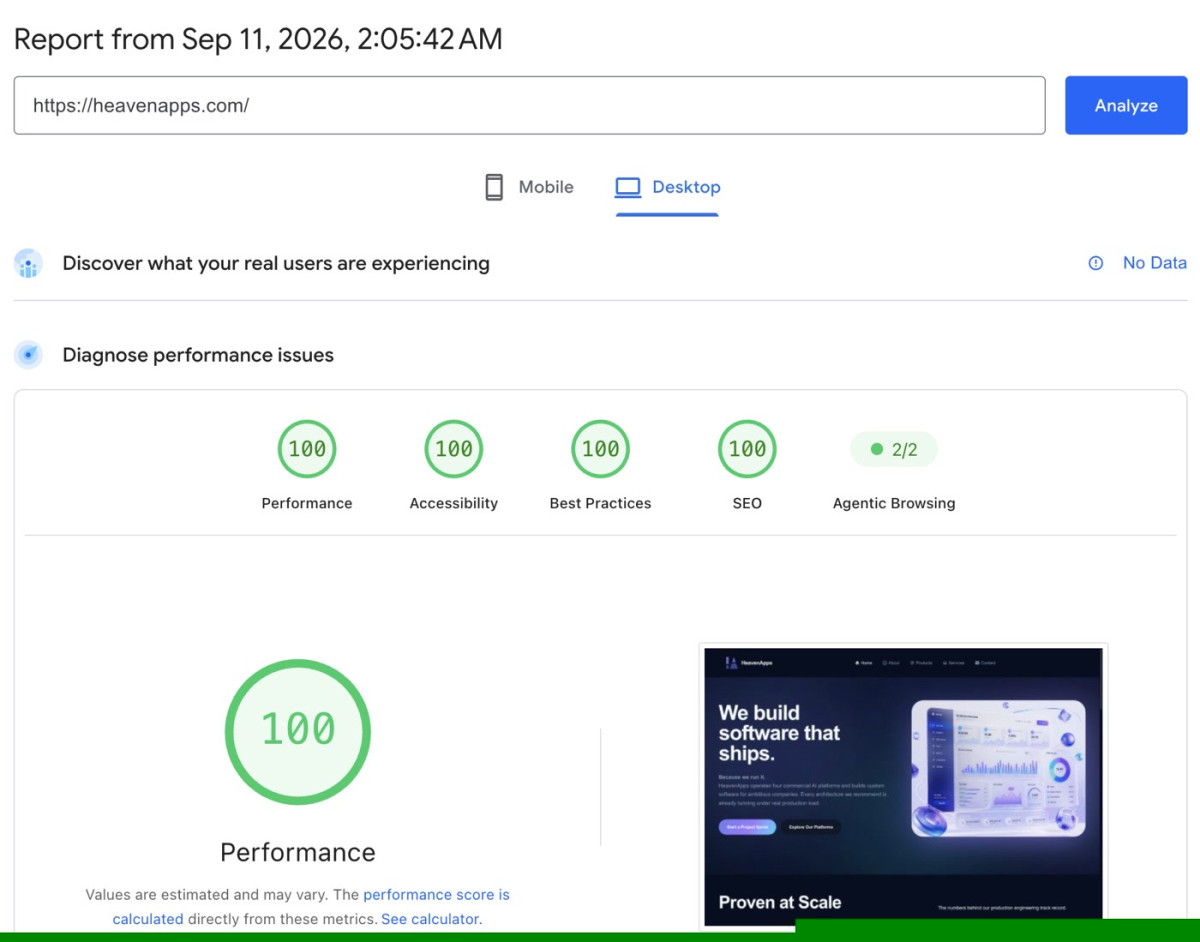
The report used for this article shows a desktop Lighthouse audit of heavenapps.com dated September 11, 2026. It displays scores of 100 for Performance, Accessibility, Best Practices, and SEO, plus 2/2 for Agentic Browsing.
That is a strong result for the tested page and test conditions, and a useful example of what a polished Webmarlin-built site can achieve. It is also important to read the report carefully: the screenshot says “No Data” under real-user experience. A Lighthouse score is a controlled lab snapshot; it is not the same as Core Web Vitals field data collected across visitors’ devices, networks, and interactions. The report itself notes that values are estimated and may vary.
A 100 Performance score is encouraging, but it does not by itself prove that every page, every device, or every visitor experience will score the same. Check mobile as well as desktop, test important pages and flows, and look for field data when it becomes available. Google describes the difference between lab and field measurements in its Web Vitals measurement guide.
How to measure and improve your own site
Use a repeatable process so you can tell whether a change actually helped:
- Choose the page and task. Start with your homepage or a high-traffic page, then test the action visitors care about: opening a menu, sending a form, booking, or checking out.
- Run a lab test. PageSpeed Insights and Lighthouse can identify likely problems under controlled conditions. Run more than once and compare similar device settings; lab results can vary.
- Check real-user data. PageSpeed Insights and Search Console can show field data when enough eligible visits are available. Field data reflects real devices and conditions, while a lab test helps reproduce and diagnose issues.
- Fix the biggest barrier first. If LCP is slow, inspect the server response and largest above-the-fold asset. If INP is poor, investigate the slow interaction and the JavaScript work it triggers. If CLS is high, look for images, embeds, fonts, or injected content that changes the layout.
- Retest the same page and task. Change one major factor at a time where possible, then test again. Keep an eye on the page’s appearance and function as well as its score.
Lighthouse is particularly useful before launch and while making changes. It cannot reproduce every user interaction, so its Total Blocking Time (TBT) is a diagnostic proxy for responsiveness—not a direct INP measurement. For INP, real interactions and field data matter. See the Google tools guide for Web Vitals.
Make performance part of building your site
You do not need to chase a perfect score on every page before sharing useful information with customers. Focus on the pages and actions that matter most, make changes that remove real friction, and measure again. A fast, stable page is one that helps people get to the information or action they came for.
A website builder can make launch and ongoing editing simpler, but content choices still affect the experience. Large images, unnecessary embeds, and too many scripts can slow down a page on any platform. Choose images that fit their display size, keep each page focused, and test the site on a phone as well as a computer.
Core Web Vitals offer a clear starting point: show the main content quickly, respond when visitors interact, and keep the page steady while it loads. Those are good technical goals because they support a simpler, more comfortable experience for the people your website is there to serve.
Frequently asked questions
Are Core Web Vitals the same as a Lighthouse score?
No. Core Web Vitals are specific experience metrics, and field data evaluates them across real visits. Lighthouse produces a lab audit and an overall Performance score under a particular test setup. Lighthouse can help diagnose issues, but its score is not a substitute for real-user Core Web Vitals data.
Does a good score guarantee better search rankings?
No. Google recommends good Core Web Vitals as part of a good page experience, but many signals contribute to search results. A passing score is not a ranking guarantee.
Which page should I test first?
Start with the homepage or the page visitors most often land on, then test the pages tied to your main business goals. Include the full action—such as finding a service and submitting the contact form—not just the first screen.
Should I optimize for mobile or desktop?
Check both. The screenshot above is a desktop report; mobile devices and networks can produce different results. Test the experience your visitors actually use, and pay special attention to mobile layouts and touch interactions.